MVSep Bowed Strings (strings, other)
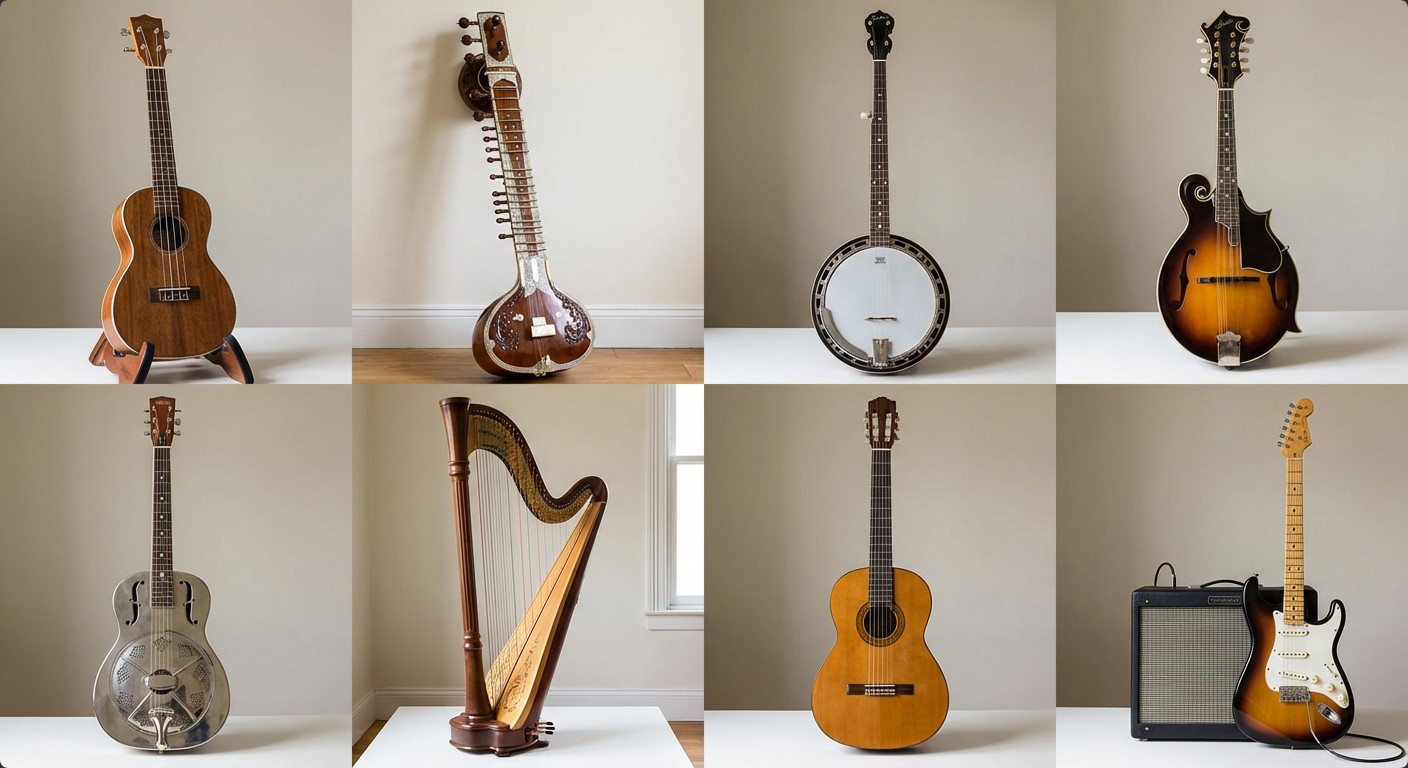
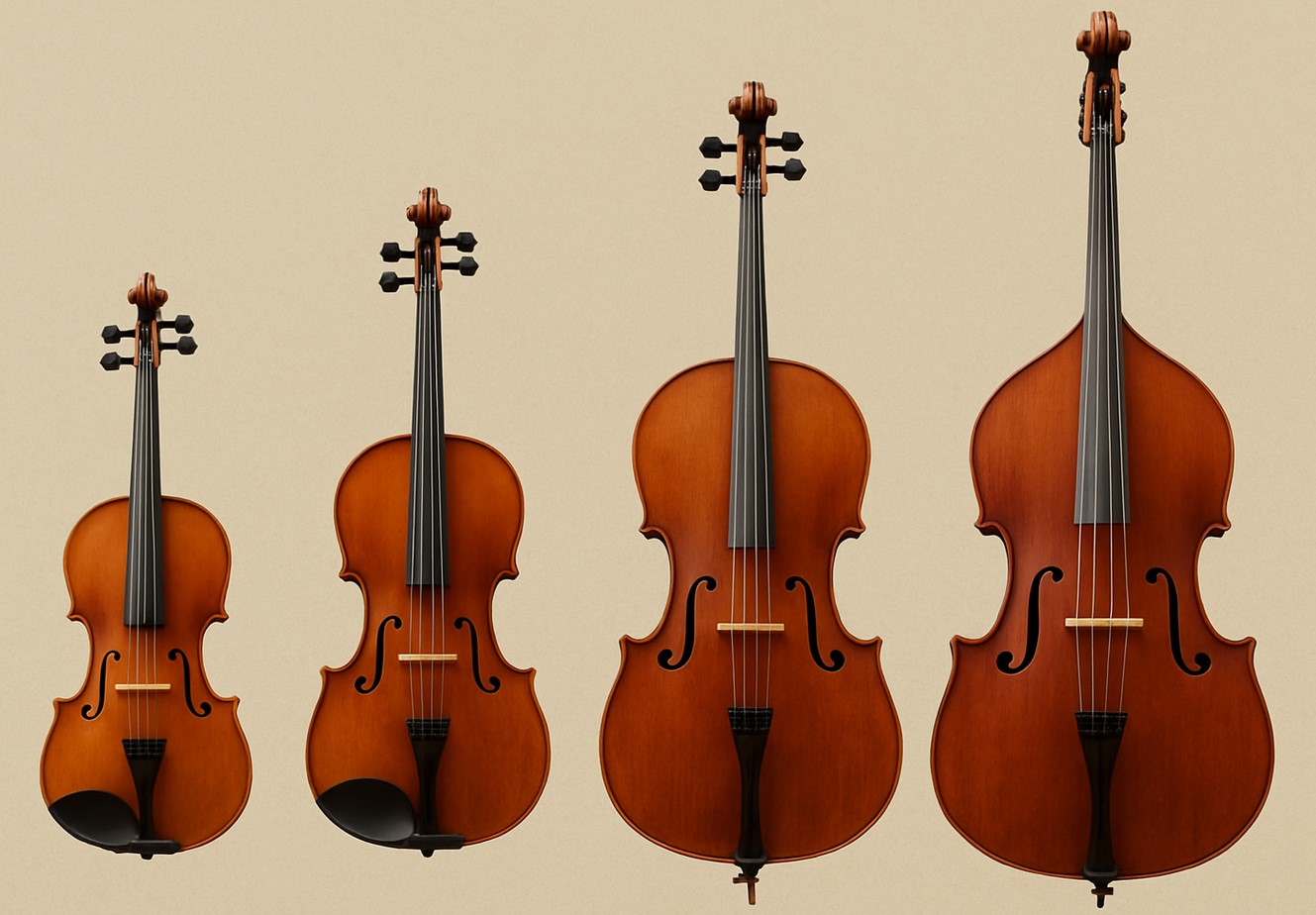
The MVSep Bowed Strings is a high quality model for separating music into bowed string instruments and everything else. List of instruments: Fiddle, Violin, Viola, Cello, Double Bass.

The MVSep Bowed Strings is a high quality model for separating music into bowed string instruments and everything else. List of instruments: Fiddle, Violin, Viola, Cello, Double Bass.

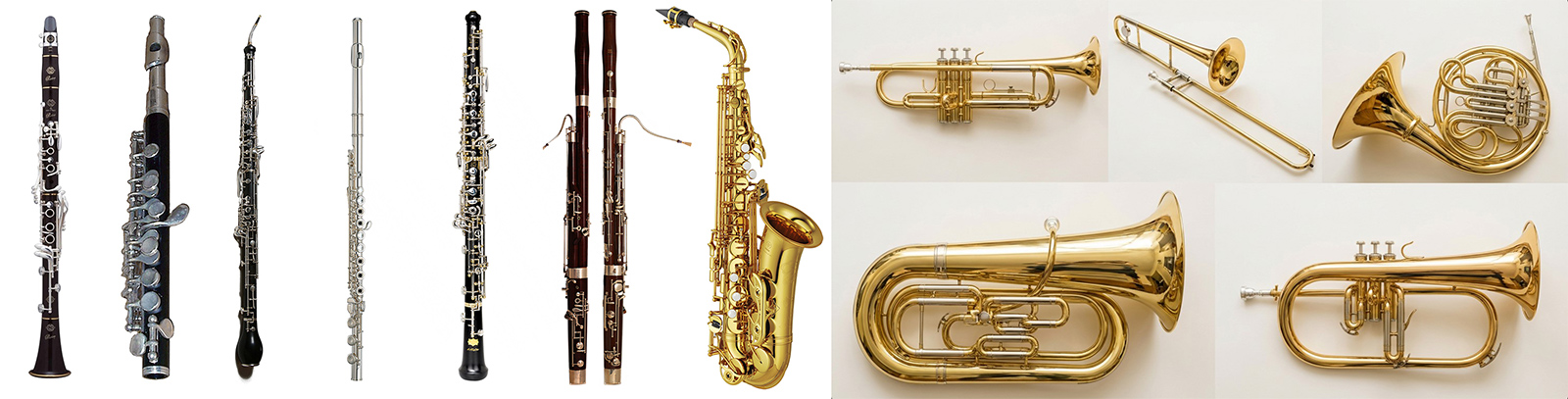
The MVSep Wind model produces high-quality separation of music into a wind part and everything else. The MVSep Wind model exists in 2 different variants based on following architectures: MelRoformer and SCNet Large. Wind includes 2 categories of instruments: brass and woodwind. More specific we inluded in wind: flute, saxophone, trumpet, trombone, horn, clarinet, oboe, harmonica, bagpipes, bassoon, tuba, kazoo, piccolo, flugelhorn, ocarina, shakuhachi, melodica, reeds, didgeridoo, mussette, gaida.
Quality metrics
| Algorithm name | Wind dataset | |
| SDR Wind | SDR Other | |
| MelBand Roformer | 6.73 | 16.10 |
| SCNet Large | 6.76 | 16.13 |
| MelBand + SCNet Ensemble | 7.22 | 16.59 |
| MelBand + SCNet Ensemble (+extract from Instrumental) | --- | --- |
| BS Roformer | 9.82 | 19.19 |

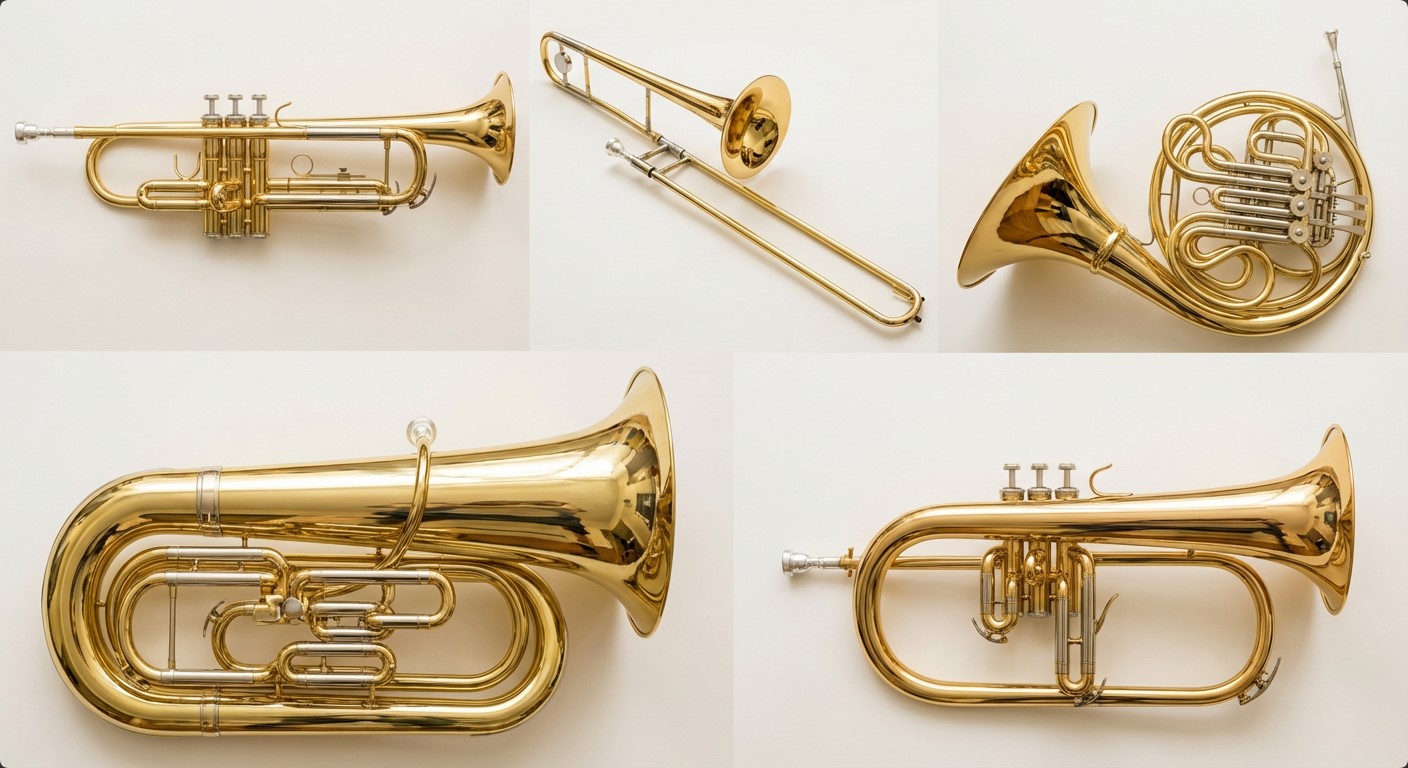
The MVSep Brass is a high quality model for separating music into brass wind instruments and everything else. List of instruments: trumpet, trombone, horn, tuba, flugelhorn, untagged brass.

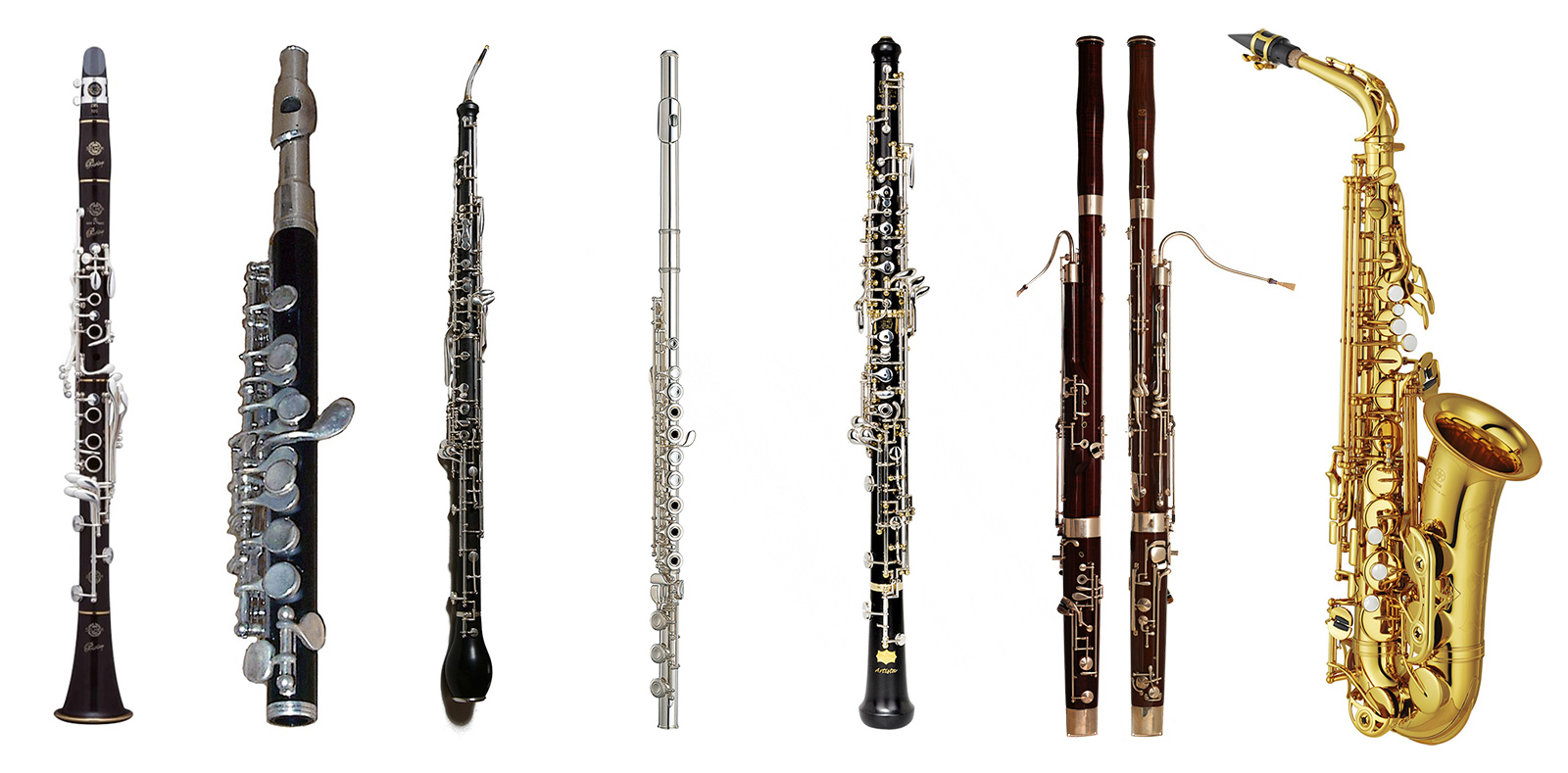
The MVSep Woodwind is a high quality model for separating music into woodwind instruments and everything else. List of instruments: oboe, saxophone, flute, bassoon, clarinet, piccolo, english horn, untagged woodwind.

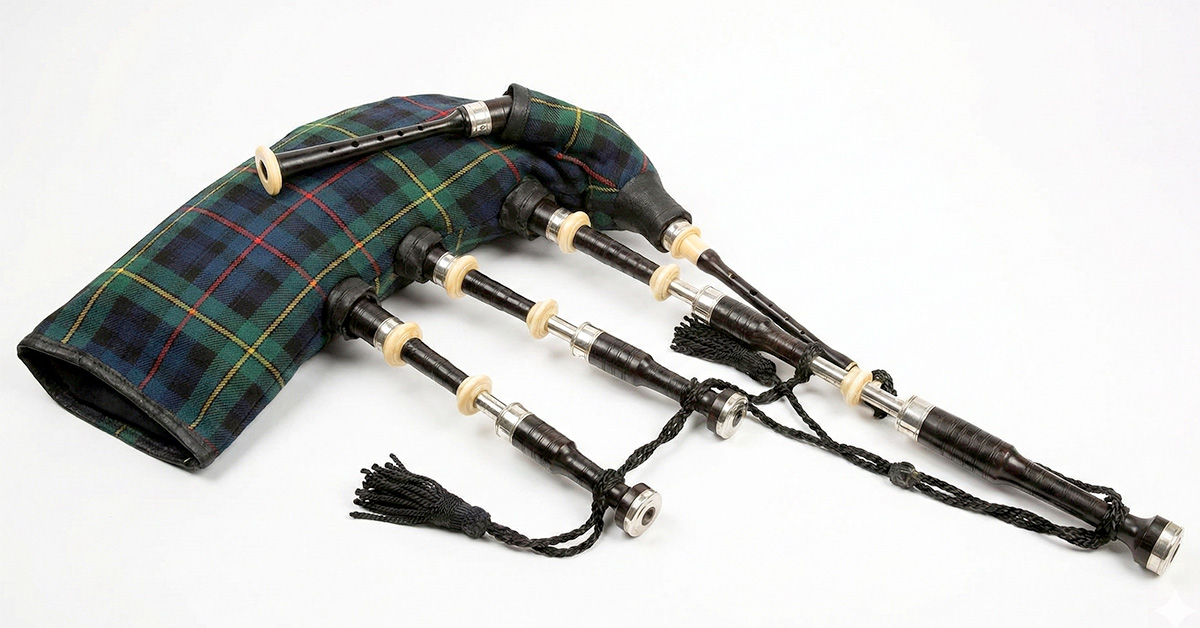
The bagpipe (Bagpipes) is a traditional wind musical instrument known for its characteristic piercing and continuous sound.
How it is constructed:
The bag (reservoir): Usually made of animal skin or modern synthetic materials. It serves to store air.
Blowpipe: Through this, the musician fills the bag with air using their mouth (in some variations, small bellows pumped by the elbow are used instead).
Melody pipe (chanter): A pipe with finger holes, on which the musician plays the main melody by moving their fingers.
Drone pipes (drones): One or more pipes that produce a constant, sustained background chord on a single note.
The principle of playing is that the musician inflates the bag and then presses on it with their arm, evenly pushing air into the sound pipes. Thanks to this reservoir, the music does not stop, even when the performer takes a breath.
Although the bagpipe is most often associated with Scotland (Great Highland Bagpipe) and Celtic culture, various historical variations of it exist throughout Europe, North Africa, and the Middle East.

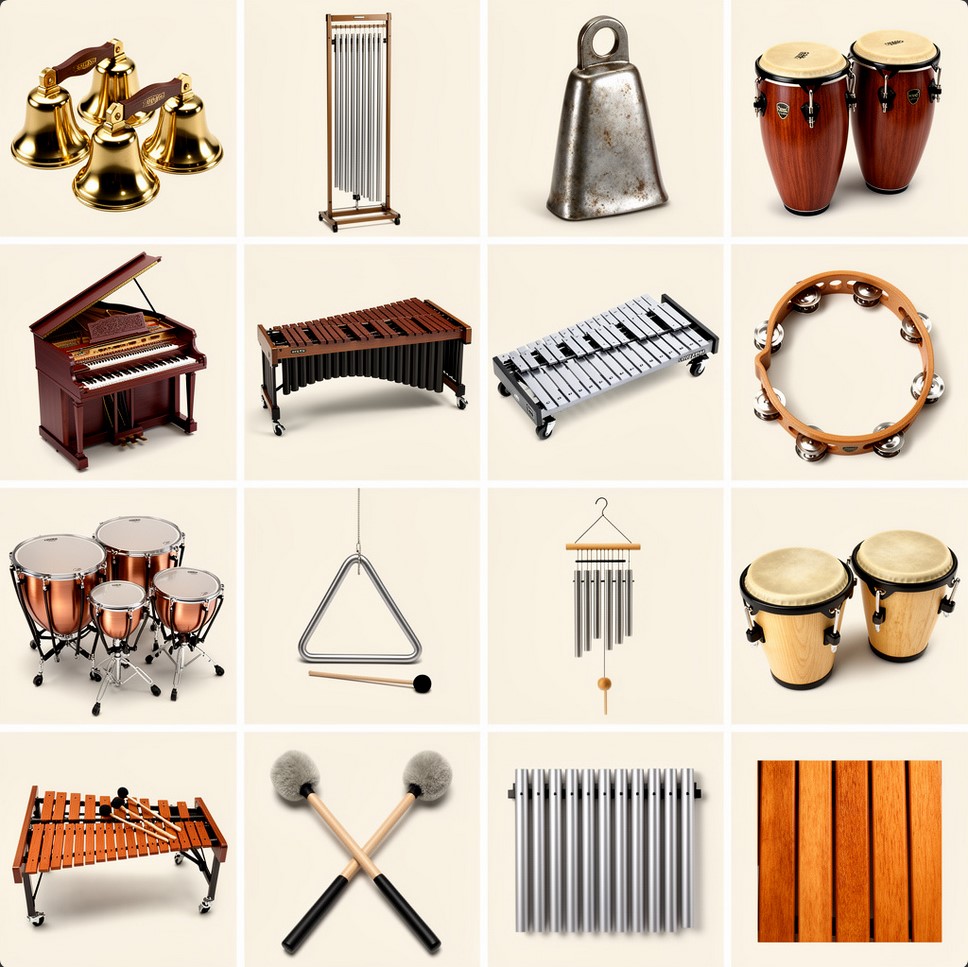
The MVSep Percussion is a high quality model for separating music into percussion instruments and everything else. List of instruments: bells, tubular bell, cow bell, congas, celeste, marimba, glockenspiel, tambourine, timpani, triangle, wind chimes, bongos, clap, xylophone, mallets, metal bars, wooden bars.

BandIt Plus model for separating tracks into speech, music and effects. The model can be useful for television or film clips. The model was prepared by the authors of the article "A Generalized Bandsplit Neural Network for Cinematic Audio Source Separation" in the repository on GitHub. The model was trained on the Divide and Remaster (DnR) dataset. And at the moment it has the best quality metrics among similar models.
Quality table
| Algorithm name | DnR dataset (test) |
||
| SDR Speech | SDR Music | SDR Effects | |
| BandIt Plus | 15.62 | 9.21 | 9.69 |
Bandit v2 is a model for cinematic audio source separation in 3 stems: speech, music, effects/sfx. It was trained on DnR v3 dataset.
More information in official repository: https://github.com/kwatcharasupat/bandit-v2
Paper: https://arxiv.org/pdf/2407.07275
MVSep DnR v3 is a cinematic model for splitting tracks into 3 stems: music, sfx and speech. It is trained on a huge multilingual dataset DnR v3. The quality metrics on the test data turned out to be better than those of a similar multilingual model Bandit v2. The model is available in 3 variants: based on SCNet, MelBand Roformer architectures, and an ensemble of these two models. See the table below:
| Algorithm name | SDR Metric on DnR v3 leaderboard |
||||
| music (SDR) | sfx (SDR) | speech (SDR) | |||
| SCNet Large | 9.94 | 11.35 | 12.59 | ||
| Mel Band Roformer | 9.45 | 11.24 | 12.27 | ||
| Ensemble (Mel + SCNet) | 10.15 | 11.67 | 12.81 | ||
| Bandit v2 (for reference) | 9.06 | 10.82 | 12.29 | ||
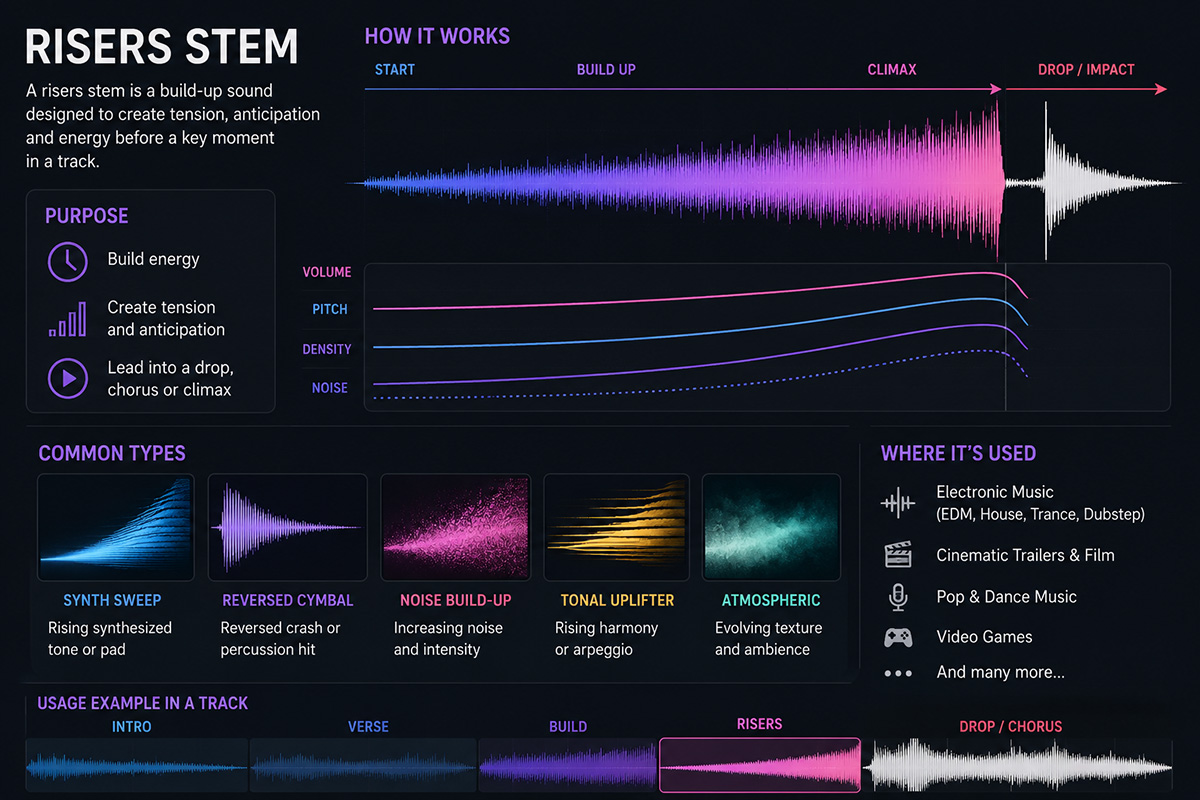
Braam is not a traditional physical instrument, but a powerful cinematic sound effect (virtual instrument) that has become an absolute standard in modern film and trailer music.
Main features:
Sound: It is a massive, low-frequency, rumbling, and often aggressive sound. It resembles an apocalyptic blast of a huge ship's horn, heavy metallic scraping, or an alarm signal.
Origin: This sound gained massive popularity after the release of the movie "Inception" (2010) with music by Hans Zimmer, which is why it is often called the Inception Horn.
How it is created: As a rule, it is the result of complex sound design. The base is formed by powerful low brass instruments (trombones, tubas, French horns). Then they are layered over heavy synthesizer basses and heavily processed with effects: distortion, saturation, and deep reverberation.
Today, Braam exists in the form of ready-made samples and libraries for virtual synthesizers (VST plugins), which composers use to instantly give a track scale, tension, or an epic feel.

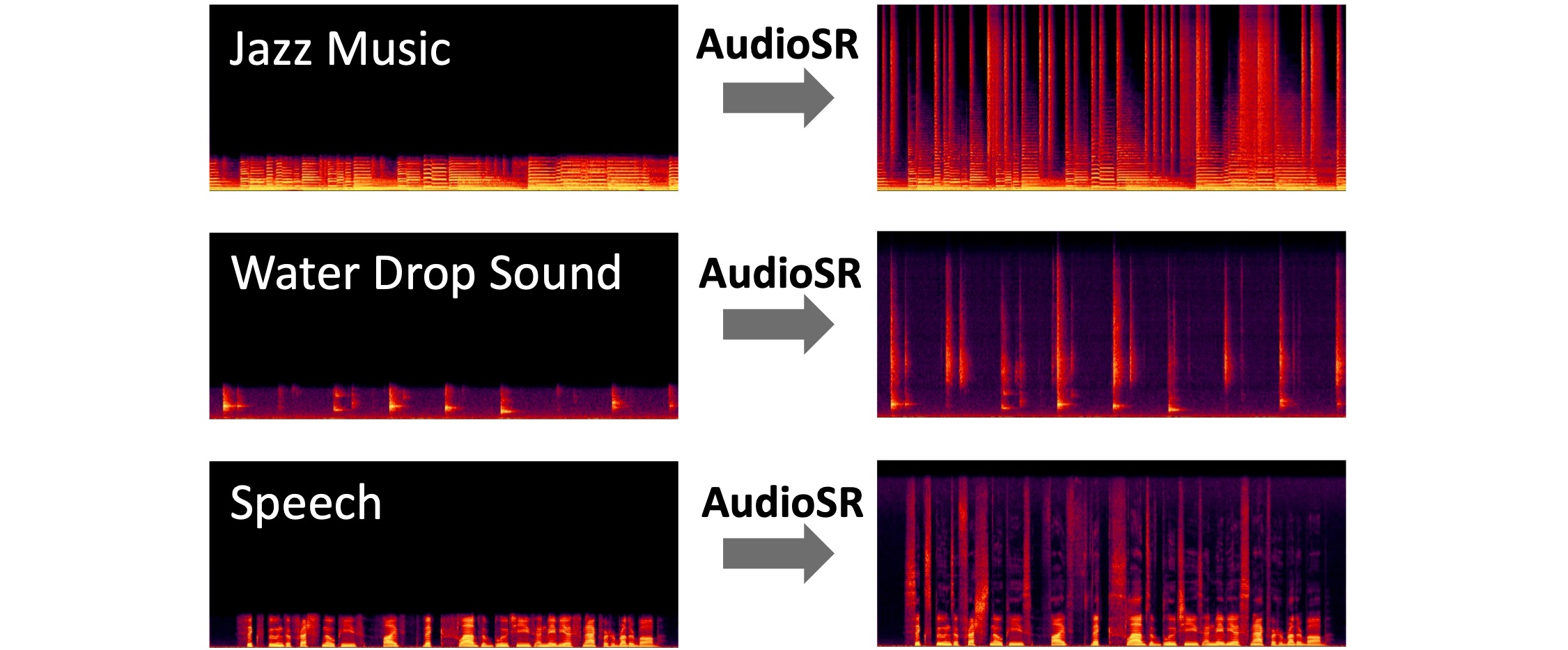
The algorithm restores the quality of audio. Model was proposed in this paper and published on github.
There are 3 models available:
1) MP3 Enhancer (by JusperLee) - it restores MP3 files compressed with bitrate 32 kbps up to 128 kbps. It will not work for files with larger bitrate.
2) Universal Super Resolution (by Lew) - it restore higher frequences for any music
3) Vocals Super Resolution (by Lew) - it restore higher frequences and overall quality for any vocals
Set of different models to remove reverberation effect from music/vocals.
| Author | Architecture | Works with | SDR (no independent testing yet) | Link |
| FoxJoy | MDX-B | Full track | ~6.50 | |
| anvuew | MelRoformer | Only vocals | 7.56 | |
| anvuew | BSRoformer | Only vocals | 8.07 | |
| anvuew v2 | MelRoformer | Only vocals | --- | |
| Sucial | MelRoformer | Only vocals | 10.01 | |
| anvuew | BSRoformer | Only vocals (Room) | 13.74 | HF Link |
| anvuew | BSRoformer | Only vocals (Stereo) | 22.50 | HF Link |
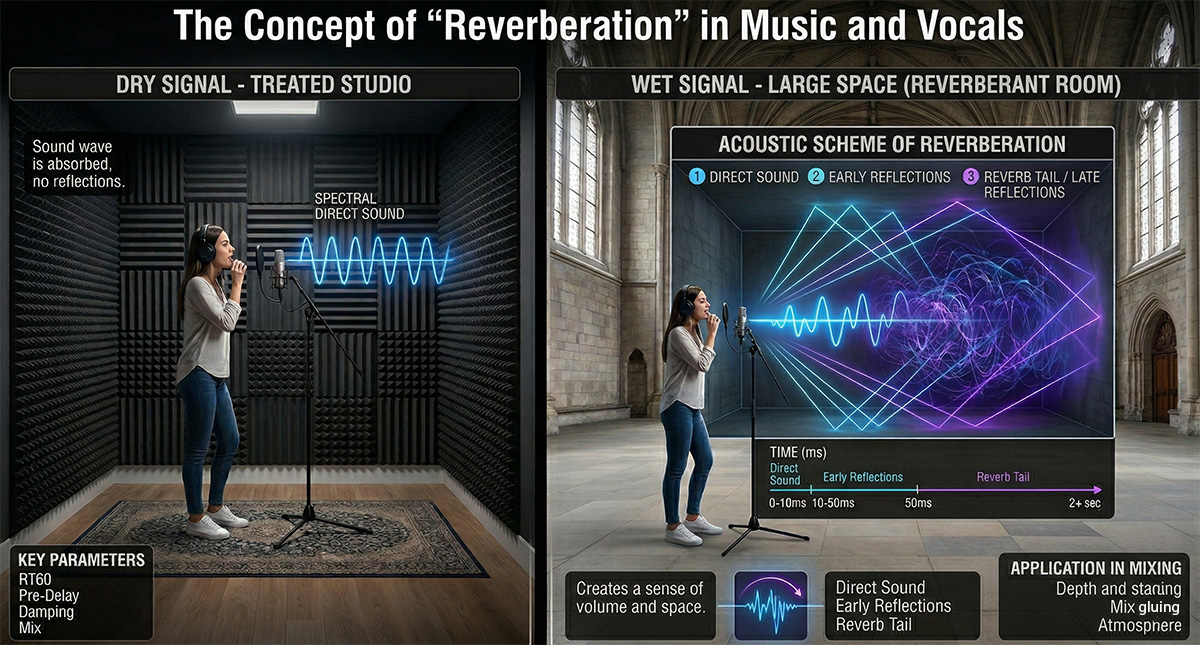
Reverberation (Reverb) is the physical process of gradual sound decay in an enclosed space after the sound source has stopped. If a regular echo is distinct, separate copies of a sound (like shouting in the mountains: "Hello... hello... hello"), then reverberation — is a dense, continuous humming cloud of thousands of blended reflections from walls, the floor, the ceiling, and other surfaces (like the sound of a clap in an empty cathedral or a stairwell).
In audio engineering, the reverb effect is used to place a dry (studio-recorded) sound into a virtual space and give it volume and depth.
Acoustically, this process can be divided into three stages:
Direct Sound: The sound wave that reaches the listener or microphone in a straight line, without any reflections. This is the loudest and clearest signal.
Early Reflections: The first echoes that bounce off the nearest surfaces and reach the ears a few milliseconds after the direct sound. They are what give our brain information about the size and shape of the room we are in.
Reverb Tail (Late Reflections): A multitude of chaotic, intertwining reflections that bounce off surfaces again and again. They merge into a continuous hum and gradually lose energy (decay).
When you open a reverb plugin in a DAW (Digital Audio Workstation), you control the physical properties of this virtual room:
Size / Room Size: Sets the volume of the virtual space (from a tiny vocal booth to a massive stadium).
Decay / Reverb Time / RT60: The time (usually in seconds) it takes for the reverb tail to decay by 60 decibels, meaning it practically disappears.
Pre-Delay: A very important parameter that sets the pause (in milliseconds) between the direct sound and the onset of reverberation. Increasing Pre-Delay helps separate the vocal or instrument from the "tail", preserving their clarity while maintaining the sense of a large space.
Damping: Simulates sound absorption. In real life, soft surfaces (carpets, people, curtains) quickly absorb high frequencies, so a long reverb tail usually sounds more muffled than the direct signal.
Mix / Dry/Wet: The ratio between the original dry signal (Dry) and the processed signal (Wet).
Creating depth (staging): Reverb acts as the Z-axis (depth) in a mix. A loud and dry sound appears close to the listener (right in their face), while a quiet sound with a lot of reverb seems distant.
Gluing the mix: If all instruments are recorded in different deadened studios, the mix can sound disjointed. Sending them to a common reverb bus (even in small amounts) places them into a single acoustic space.
Artistic effect: Creating an ethereal, ambient, or epic atmosphere (for example, the Shimmer effect, where the reverb tail is also pitched up an octave).
Removing reverberation (or dereverberation) — is the process of cleaning an audio signal from acoustic room reflections to obtain the original dry sound. Although reverb makes a sound beautiful and spacious, in many professional scenarios, this effect turns into unwanted noise or a serious obstacle. Here are the main reasons why there is a need to "dry out" the sound:
Music Source Separation: When extracting vocals or individual instruments from a mixed stereo track, reverb tails create a serious problem — they "eat into" the useful signal. Effective dereverberation allows you to get a truly clean acapella or instrument stem that sounds as if it was just recorded in a studio, rather than extracted from a concert hall.
Automatic Speech Recognition (ASR) systems: Room echo and hum are the worst enemies of acoustic models. Reflections "smear" short consonant sounds and phonemes. In complex machine learning tasks, such as creating children's speech recognition models, where articulation is often already unclear, the presence of reverberation catastrophically reduces transcription accuracy. Therefore, dereverberation is a critical preprocessing step for audio datasets.
Sampling and remixing: If you take a vocal sample or a drum loop from an old recording, it already contains the space of the original mix. If you add this sample to your track and apply your own new reverb on top of it, it will result in acoustic "mud" (the effect of reverb on reverb). To integrate someone else's sound into your mix architecture, it must first be cleaned.
Video and film post-production (ADR & Location Sound): Actors' speech is often recorded with shotgun microphones right on the set (for example, in an echoey empty room or a stairwell). For the dialogue to sound tight, intelligible, and studio-quality, the sound engineer needs to suppress the natural reflections of the location.
Restoration and forensics: Recordings from surveillance cameras, hidden microphones, or dictaphones often contain so much room hum that the words become unintelligible. Suppressing the reverberation helps restore speech intelligibility.
How does it work technologically? In the past, sound engineers tried to combat the room using Noise Gates and Transient Shapers, which simply cut off the quiet tails of the sounds. This was a crude method and often distorted the useful signal itself. Today, the task of dereverberation is solved using AI and neural networks that are trained to analyze the spectrogram, distinguish direct signal patterns from reflection patterns, and mathematically subtract the latter without damaging the original.

Algorithm AudioSR: Versatile Audio Super-resolution at Scale. Algorithm restores high frequencies. It works on all types of audio (e.g., music, speech, dog, raining, ...). It was initially trained for mono audio, so it can give not so stable result on stereo.
Metric on Super Resolution Checker for Music Leaderboard (Restored): 25.3195
Authors' paper: https://arxiv.org/pdf/2309.07314
Original repository: https://github.com/haoheliu/versatile_audio_super_resolution
Original inference script prepared by @jarredou: https://github.com/jarredou/AudioSR-Colab-Fork

FlashSR - audio super resolution algorithm for restoring high frequencies. It's based on paper FlashSR: One-step Versatile Audio Super-resolution via Diffusion Distillation.
Metric on Super Resolution Checker for Music Leaderboard (Restored): 22.1397
Original repository: https://github.com/jakeoneijk/FlashSR_Inference
Inference script by @jarredou: https://github.com/jarredou/FlashSR-Colab-Inference
Audio generation based on a given text prompt. The generation uses the Stable Audio Open 1.0 model. Audio is generated in Stereo format with a sample rate of 44.1 kHz and duration up to 47 seconds. The quality is quite high. It's better to make prompts in English.
Example prompts:
1) Sound effects generation: cats meow, lion roar, dog bark
2) Sample generation: 128 BPM tech house drum loop
3) Specific instrument generation: A Coltrane-style jazz solo: fast, chaotic passages (200 BPM), with piercing saxophone screams and sharp dynamic changes
Whisper is a pre-trained model for automatic speech recognition (ASR) and speech translation. It has several version. On MVSep we use the largest and the most precise: "Whisper large-v3". The Whisper large-v3 model was trained on several millions hours of audio. It's multilingual model and it guesses the language automatically. To apply model to your audio you have 2 options:
1) "Apply to original file" - it means that whisper model will be applied directly to file you submit
2) "Extract vocals first" - in this case before using whisper, BS Roformer model is applied to extract vocals first. It can remove unnecessary noise to make output of Whisper better.
Original model has some problem with transcription timings. It was fixed by @linto-ai. His transcription is used by default (Option: New timestamped). You can return to original timings by choosing option "Old by whisper".
More info on model can be found here: https://huggingface.co/openai/whisper-large-v3 and here: https://github.com/openai/whisper
Parakeet is a family of state-of-the-art Automatic Speech Recognition (ASR) models developed by NVIDIA in collaboration with Suno.ai. These models are built on the Fast Conformer architecture, designed to deliver a balance of high transcription accuracy and exceptional inference speed. They are widely recognized for outperforming much larger models (like OpenAI's Whisper) in efficiency while maintaining competitive or superior Word Error Rates (WER). Quality metric WER: 6.03 on Huggingface Open ASR Leaderboard.
MVSep provide two versions of model (v2 and v3):
Model page v2: https://huggingface.co/nvidia/parakeet-tdt-0.6b-v2
Model page v3: https://huggingface.co/nvidia/parakeet-tdt-0.6b-v3
Released as a highly efficient English-focused model, v2 established Parakeet as a leader in speed-to-accuracy ratio.
The v3 release marked the expansion of the efficient Parakeet architecture from English-only to a multilingual domain without increasing the model size.

VibeVoice — is a model for generating natural conversational dialogues from text with the ability to use a reference voice for cloning purposes.
We need phonetic diversity (all sounds of the language) and lively intonation. A text length of about 35–40 words when read calmly will take just ~15 seconds.
Here are three options in English for different tasks:
The best choice for general use. Contains complex sound combinations to tune clarity.
"To create a perfect voice clone, the AI needs to hear a full range of phonetic sounds. I am speaking clearly, taking small pauses, and asking: can you hear every detail? This short sample captures the unique texture and tone of my voice."
For voiceovers in videos, YouTube, or blogs. Read vividly, with a smile, changing the pitch of your voice.
"Hey! I’m recording this clip to test how well the new technology works. The secret is to relax and speak exactly like I would to a friend. Do you think the AI can really copy my style and energy in just fifteen seconds?"
For presentations, audiobooks, or official announcements. Read confidently, slightly slower, emphasizing word endings.
"Voice synthesis technology is rapidly changing how we communicate in the digital age. It is essential to speak with confidence and precision to ensure high-quality output. This brief recording provides all the necessary data for a professional and accurate digital clone."
Pronunciation: Try to articulate word endings clearly (especially t, d, s, ing). Models "love" clear articulation.
Flow: Don't read like a robot. In English, melody (voice melody) is important — the voice should "float" up and down a bit, rather than sounding on a single note.
Breathing: If you pause at a comma or period, don't be afraid to take an audible breath. This will add realism to the clone.
VibeVoice (TTS) — is a model for generating natural conversational dialogues from text, capable of creating dialogues with up to 4 speakers and durations of up to 90 minutes.
The text must be in English or Chinese; quality is not guaranteed for other languages. The maximum text length is 5000 characters. Avoid special characters. The text must be formatted specifically to indicate speakers:
Speaker 1: Hello! How are you today?
Speaker 2: I'm doing great, thanks for asking!
Speaker 1: That's wonderful to hear.
Speaker 3: Hey everyone, sorry I'm late!
Hello! How are you today?
I'm doing great!
Important:
Speaker N: (where N is a number from 1 to 4)Speaker 1: = speaker 1: = SPEAKER 1If you need a monologue, you do not need to specify a speaker.
Monologue (1 speaker):
Speaker 1: Today I want to talk about artificial intelligence.
Speaker 1: It's changing our world in incredible ways.
Speaker 1: From healthcare to entertainment, AI is everywhere.
Dialogue (2 speakers):
Speaker 1: Have you tried the new restaurant downtown?
Speaker 2: Not yet, but I've heard great things about it!
Speaker 1: We should go there this weekend.
Speaker 2: That sounds like a perfect plan!
Group conversation (3-4 speakers):
Speaker 1: Welcome to our podcast, everyone!
Speaker 2: Thanks for having us!
Speaker 3: It's great to be here.
Speaker 4: I'm excited to share our thoughts today.
Speaker 1: Let's start with introductions.
Qwen3-TTS is a powerful speech generation model offering comprehensive support for voice cloning, voice design, ultra-high-quality human-like speech generation, and natural language-based voice control. It provides developers and users with the most extensive set of speech generation features available. At MVSep, we use the largest 1.7 billion parameter model.
Original model page: https://github.com/QwenLM/Qwen3-TTS
Qwen3-TTS (Custom Voice) offers a set of 9 pre-defined speakers. Optionally, you can specify a "Voice description" to include emotions like "happy voice" or "sad voice". You can also choose the language for this model or leave it as "auto".
Qwen3-TTS is a powerful speech generation model offering support for voice cloning, voice design, ultra-high-quality human-like speech generation, and natural language-based voice control. It provides developers and users with the most extensive set of speech generation features available. At MVSep, we use the largest 1.7 billion parameter model.
Original model page: https://github.com/QwenLM/Qwen3-TTS
Qwen3-TTS (Voice Design) allows you to generate speech with a custom voice that can be described in detail in the "Voice description" field. You can specify the speaker's gender and age, and add emotions, such as "happy voice" or "sad voice". You can also choose the language for this model or leave it as "auto".
Qwen3-TTS is a powerful speech generation model offering support for voice cloning, voice design, ultra-high-quality human-like speech generation, and natural language-based voice control. It provides developers and users with the most extensive set of speech generation features available. At MVSep, we use the largest 1.7 billion parameter model.
Original model page: https://github.com/QwenLM/Qwen3-TTS
Qwen3-TTS (Voice Cloning) allows you to upload a reference audio file to generate the target text using the sample voice. To improve cloning quality, you can optionally provide the audio transcript in the "Reference text in audio" field. You can also choose the language for this model or leave it as "auto".
Bark — is a transformer-based model created by Suno, representing not just a traditional text-to-speech tool, but a fully generative "text-to-audio" system. Its capabilities go far beyond ordinary voicing: besides creating highly realistic speech in multiple languages, Bark can generate music, background noises, and simple sound effects. A unique feature of the model is the ability to reproduce subtle non-verbal communications, such as laughter, sighs, and crying, making the resulting sound maximally alive and natural.
Striving to support the community, the developers have opened access to pre-trained checkpoints that are ready for work and allowed even for commercial use. However, it is important to consider that Bark was created primarily for research tasks. Being a fully generative model, it can behave unpredictably and sometimes deviate from the provided text prompts.
Official model repository: https://github.com/suno-ai/bark
Unlike classic TTS systems, Bark does not use SSML markup. Instead, it is trained to recognize specific text inserts (tags) as instructions for generating sounds.
All control commands are written in square brackets. Important: The tags themselves must be written in English, even if the main text you are generating is in Russian, Spanish, or any other language.
Syntax:
Text before effect [effect_tag] text after effect.
Bark officially recognizes the following set of tokens for non-verbal sounds:
| Tag | Description | Usage Example |
[laughter] |
Loud, distinct laugh | Hello! [laughter] That was so funny. |
[laughs] |
Short chuckle, giggling | Well yes, of course [laughs]. |
[sighs] |
Heavy sigh (fatigue, relief) | [sighs] I'm so tired of this work. |
[music] |
Instrumental music insertion | [music] (background music playing) |
[gasps] |
Sharp breath (fright, surprise) | [gasps] I didn't expect to see you here! |
[clears throat] |
Throat clearing (attracting attention) | [clears throat] Gentlemen, may I have your attention. |
Note: Variations like [man laughs] and [woman laughs] also exist, but they work most stably if the speaker's gender (Speaker History) matches the tag.
To make the model "sing" the text rather than read it, musical notes are used.
Method: Wrap the text in musical note symbols ♪ (Shift + Alt + V on Mac or Alt+13 on Win, or just copy).
Example: ♪ In the jungle, the mighty jungle, the lion sleeps tonight ♪
Tip: This works best if you use English, as the training dataset contained many English songs, but results can be achieved in other languages too.
Although there are no special tags for pauses (like ), Bark is sensitive to punctuation and special characters, as it perceives text as a structure.
Ellipsis and dash (..., —): Use an ellipsis or an em dash to create pauses, hesitations, or hitches in speech.
Example: I... I'm not sure that's right.
CAPS LOCK: Sometimes (not guaranteed) writing a word in CAPITAL LETTERS can add emphasis or increase volume.
Probabilistic nature: Bark is a GPT for audio. If you write [laughter], the model will with high probability generate laughter, but sometimes it may ignore the tag or generate a strange sound.
Context matters: The tag [laughter] will work more naturally after a joke than in the middle of a tragic sentence. The model "understands" the semantics of the text.
Whispering: There is no official [whisper] tag. However, the community has noticed that adding words like "quietly" or using specific speakers (Speaker Prompts) sometimes helps, but this is a trial and error method.
Site limitations: currently, all submitted texts are trimmed to 1000 characters.
MVSep MultiSpeaker (MDX23C) - this model tries to isolate the most loud voice from all other voices. It uses MDX23C architecture. Still under development.
The algorithm adds "whispering" effect to vocals. Model was created by SUC-DriverOld. More details here.
The Aspiration model separates out:
1) Audible breaths
2) Hissing and buzzing of Fricative Consonants ( 's' and 'f' )
3) Plosives: voiceless burst of air produced while singing a consonant (like /p/, /t/, /k/).
When listening to music in stereo, we often clearly hear the vocals sounding right in front of us. But if you look at your speaker system, you will only see two speakers on the sides. There is no sound source in the middle. What you are hearing is the phantom center.
How does it work? The phantom center is a psychoacoustic illusion. It occurs when the left and right channels reproduce the exact same mono signal at identical volume levels and in perfect phase. Our brain processes the sound arriving at both ears simultaneously and creates a virtual sound source right in the center.
The foundation of the mix: Traditionally, the most important and high-energy elements of a track are placed in the center. The lead vocal, bass guitar, kick drum, and snare drum are panned dead center. This ensures that the low-frequency energy is evenly distributed across both monitors, making the mix punchy and tight.
Contrast and width: The phantom center serves as a reference point for the rest of the mix. Wide stereo effects, double-tracked guitars, or spatial synthesizers sound wide precisely because of the contrast with a dense and narrow phantom center.
Mid/Side processing: In modern mastering and stem extraction (source separation) technologies, the phantom center is often isolated into a separate channel — Mid, which is calculated as the sum of the left and right channels. This allows for EQing or isolating the vocals and rhythm section without affecting the instruments playing on the sides (Side).
The fragility of the phantom center: This illusion is very fragile. If the signal in one of the channels is delayed by even a millisecond or its phase is disrupted, the center will "drift" or disappear entirely due to phase cancellation. Therefore, when working with stereo wideners, it is always important to check the track for mono compatibility.
We currently have two algorithms available for phantom center extraction. Below are their quality metrics obtained on the validation dataset:
| Model | Center SDR | Center L1Freq | Center fullness | Center bleedless |
| Phantom Centre by wesleyr36 (mdx23c) | 8.25 | 27.52 | 19.44 | 38.92 |
| Phantom Centre by gilliaan (BSRoformer) | 16.45 | 44.00 | 37.17 | 48.76 |
| Phantom Centre by gilliaan (mdx23c) | 18.93 | 49.20 | 45.85 | 45.54 |

Matchering is a novel tool for audio matching and mastering. It follows a simple idea - you take TWO audio files and feed them into Matchering:
This algorithm matches both of these tracks and provides you the mastered TARGET track with the same RMS, FR, peak amplitude and stereo width as the REFERENCE track has.
It based on code by @sergree.
SOME (Singing-Oriented MIDI Extractor) is a MIDI extractor that can convert singing voice to MIDI sequence. The model was only trained on Chinese voice, so it might not work well in other languages.
Original page: https://github.com/openvpi/SOME
Transkun — is a modern open-source model for automatic piano music transcription (Audio-to-MIDI). The official page of the model is here. It is considered one of the best (SOTA — State of the Art) in its class. The model can recognize not only the notes themselves but also their duration, loudness (velocity), and pedal usage. Unlike many older models that analyze music «frame-by-frame» (frame-based), Transkun uses the Neural Semi-CRF (semi-Markov Conditional Random Field) approach. Instead of asking «is a note sounding at this millisecond?», the model treats events as whole intervals (from the start to the end of the note). The latest versions use a Transformer (Non-Hierarchical Transformer) which calculates the probability that a specific time segment is a note. Decoding: The Viterbi algorithm is used to find the most probable sequence of non-overlapping intervals. The model demonstrates excellent results on the MAESTRO dataset (the industry standard).

Basic Pitch is a modern neural network from Spotify’s Audio Intelligence Lab that converts melodic audio recordings into notes (MIDI format). Unlike outdated converters, this model can "hear" not only individual notes but also chords, along with the finest nuances of a performance. Official page: https://github.com/spotify/basic-pitch
Basic Pitch is an "instrument-agnostic" model. This means it handles different timbres equally well:
- Vocals: Hum a melody into a microphone, and the neural network will turn your voice into a synthesizer part.
- Strings: Acoustic and electric guitar, violin, cello.
- Keyboards: Pianos, organs, and synthesizers.
- Winds: Flute, saxophone, trumpet, and others.
Important: The model is designed for melodic instruments. It is not suitable for drums or percussion, as it focuses on pitch rather than rhythmic noise.